How to Book a Hotel Room on GHECS.com — Step-by-Step Guide
Ghecs
Whether you are planning a weekend getaway, a business trip, or a special occasion, GHECS.com makes it simple to find and book the perfect hotel room — with full visibility of room types, pricing, and amenities before you commit.
Unlike traditional booking platforms, GHECS hotels list multiple room types on a single page. That means you can compare options, see exactly what is included, and book your chosen room in one seamless flow. Here is how to do it.
Tip: GHECS.com is available on both mobile and desktop. All steps below apply to both experiences.
Step 1: Go to the Hotels Section
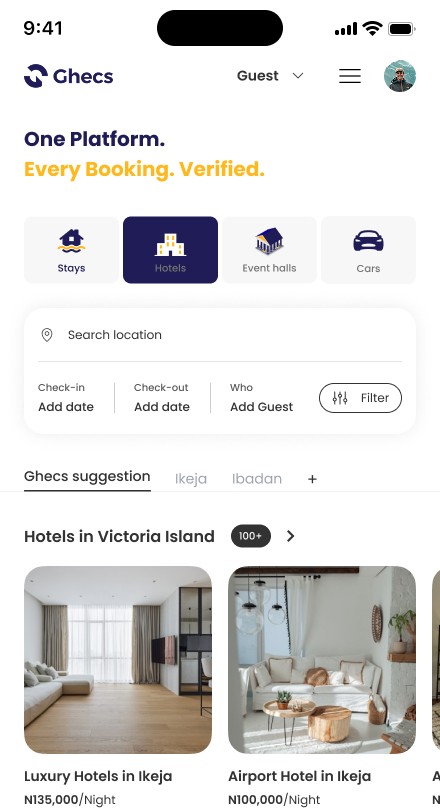
Open GHECS.com and tap the Hotels tab in the category selector on the home screen. You will see four categories: Stays, Hotels, Event Halls, and Cars. Selecting Hotels filters the platform to show only hotel properties.
Use the Search Location bar to enter your destination city or area. You can also set your Check-in and Check-out dates and the number of guests before searching — this helps surface rooms that match your specific needs right away.
Step 2: Browse Hotels & Open a Listing
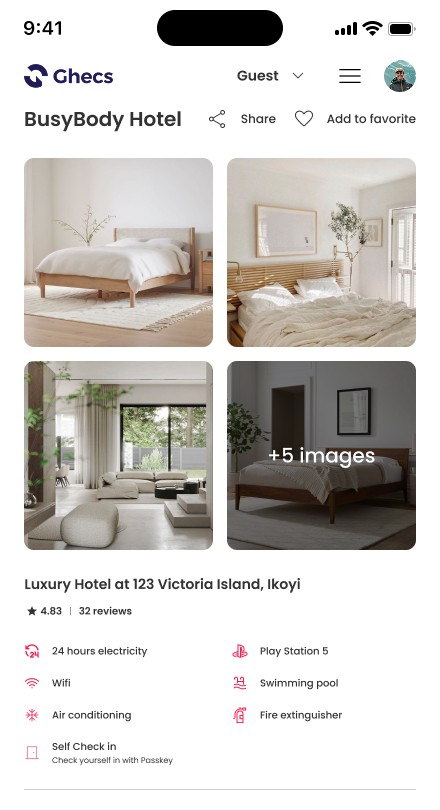
The results page displays hotel cards with property photos, names, locations, and starting prices per night. Tap any hotel card to open its full listing page.
The hotel detail page shows a photo gallery, property address, star rating, total reviews, and a complete list of property-level amenities — things like 24-hour electricity, Wi-Fi, air conditioning, swimming pool, and self check-in. Scroll down to see what makes this hotel stand out before going any further.
Step 3: Browse Available Rooms
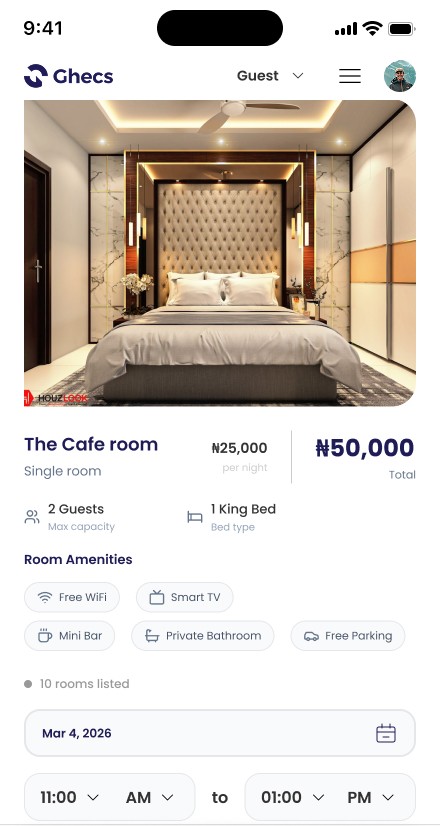
Below the hotel details, all available room types are listed directly on the same page — no extra click required. Each room card displays the room name, room type, price per night, maximum guest capacity, bed type, and room-specific amenities such as Free Wi-Fi, Smart TV, Mini Bar, Private Bathroom, and Free Parking.
You will also see how many units of each room type are available (for example, '10 rooms listed'), so you can gauge availability at a glance. Tap a room card to open its full details and proceed to booking.
Step 4: Select Your Date, Time & Number of Rooms
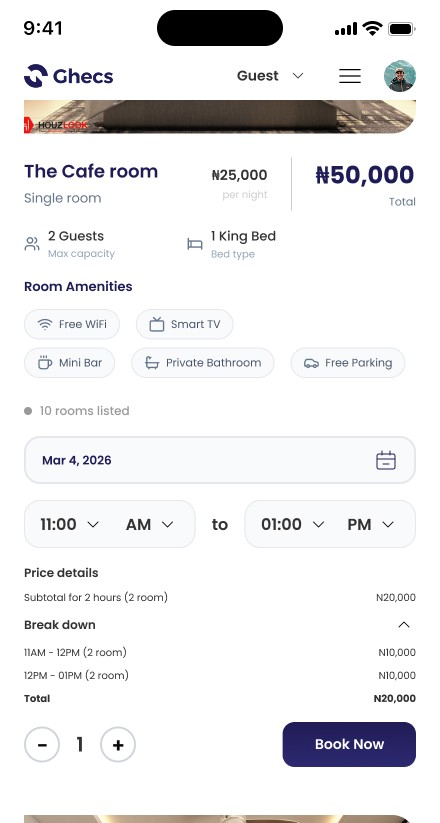
Inside the room detail view, you will see the room photo, name, per-night rate, and a total price calculated automatically based on your selection. Set your booking date using the date picker, then use the time selectors to choose your check-in and check-out times.
GHECS supports hourly bookings for hotel rooms, which is perfect for day-use stays, business meetings, or short rest stops. The Price Details section updates in real time, showing a clear breakdown by hour so you always know exactly what you are paying.
Use the room quantity selector (the minus and plus buttons at the bottom) to increase the number of rooms if you need more than one of the same type.
Step 5: Tap Book Now & Confirm
Once you are happy with your selection, tap the Book Now button. You will be taken through a short confirmation step where you can review your booking summary — property name, room type, dates, times, guest count, and total price — before proceeding to payment.
GHECS processes payments securely. Once confirmed, your reservation is sent to the host and you will receive a booking confirmation in your account and via email.
Note: Some hotel rooms on GHECS require host approval before your booking is confirmed. If you see a 'Request to Book' button instead of 'Book Now', your booking will be reviewed by the host first. Check out our separate guide on how Request to Book works.
Quick Recap
Select the Hotels tab and search your destination.
Open a hotel listing and review property details and amenities.
Browse available room types on the same page — no extra click.
Tap a room, choose your date, time slot, and number of rooms.
Review the live price breakdown and tap Book Now.
Ready to Find Your Next Hotel?
GHECS.com lists hotels across Nigeria with verified stays, transparent pricing, and flexible booking options — including hourly room bookings. Whether you need a room for a night or a few hours, your next stay is just a few taps away.
Visit www.ghecs.com to explore hotels near you.